WhatsApp Inbox
Manage WhatsApp Business conversations inside Opzello
Last updated 2026-11-01
The WhatsApp Inbox connects a WhatsApp Business number to Opzello so you can read and reply to conversations without leaving your work hub. Conversations, contacts, and analytics all live alongside your logs and meetings.
Setup
Only the workspace owner can connect a number. The section is called WhatsApp connection, in WhatsApp Settings. To open it:
- If no number is connected yet, open Inbox under WhatsApp in the sidebar and click Set Up WhatsApp. If you also see Try it with sample data, you can explore the inbox with example chats first. Nothing is sent to real customers.
- If a number is already connected, click the Settings button (the gear icon) at the top of the inbox and open WhatsApp connection.
Other members see "WhatsApp Not Connected" until the owner connects a number.
You connect through your own Meta app. Choose Manual Setup. It takes about 15 minutes the first time:
- Create a Meta app. Go to developers.facebook.com/apps, create an app of the Business type and add the WhatsApp product. Add and verify your phone number under WhatsApp → Getting Started.
- Make a permanent access token. In Meta Business Suite open System Users, add a system user, give it your app, then Generate Token with the
whatsapp_business_managementandwhatsapp_business_messagingpermissions and expiry Never. Copy it. Meta shows it only once. - Copy your App Secret. In your app open App settings → Basic and click Show next to App secret. It must be from the same app as the token.
- Connect. Paste the token and the App Secret on the setup page and click Find my WhatsApp numbers. Pick your number and click Connect this number.
- Point Meta at Opzello. Copy the Webhook URL and Verify Token shown after connecting into your app under WhatsApp → Configuration → Webhooks, then subscribe to the messages field.
- Test it. Send a WhatsApp message to your number from your own phone. The setup page shows Waiting for your first message… and turns green the moment the message arrives.
If something goes wrong
- "Meta rejected that access token": you probably copied the temporary token from the Getting Started page. It stops working after 24 hours. Make a permanent system user token (step 2).
- "Meta did not accept that App Secret": copy it again from App settings → Basic in the same app that created the token.
- Connected, but no messages arrive: check that the Webhook URL and Verify Token are saved in your Meta app, that messages is subscribed, and that your App Secret is saved. The setup page shows Add your App Secret if it is missing.
- Messages stopped after working before: your token may have expired or been removed. We email you when Meta rejects it. Paste a new permanent token on the setup page.
- Still stuck? Open Support in the Hub, choose the topic WhatsApp connection or messages, and tell us what the setup page shows.
Once connected, your phone number appears at the top of the inbox and new messages start to arrive.
Inbox Layout
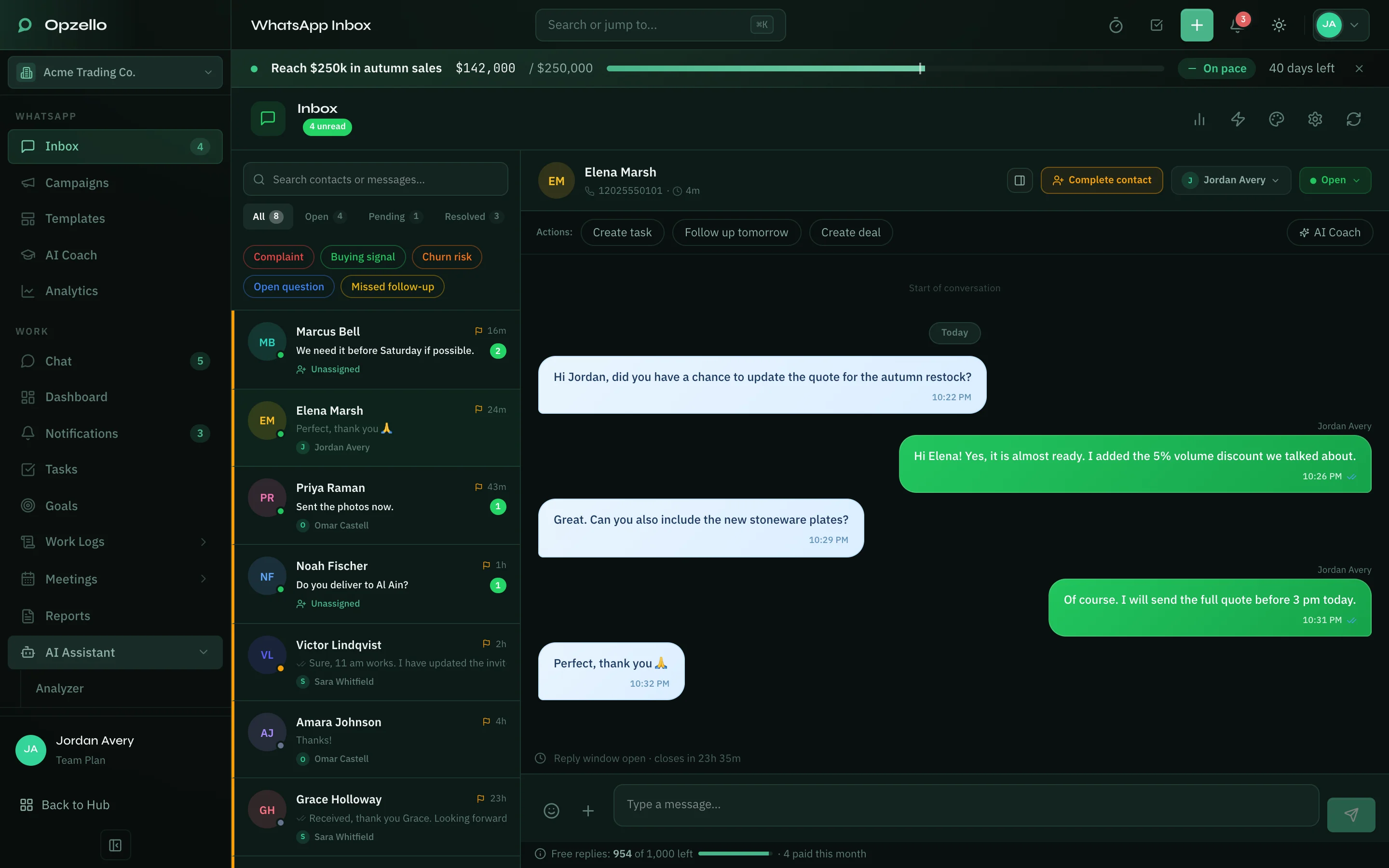
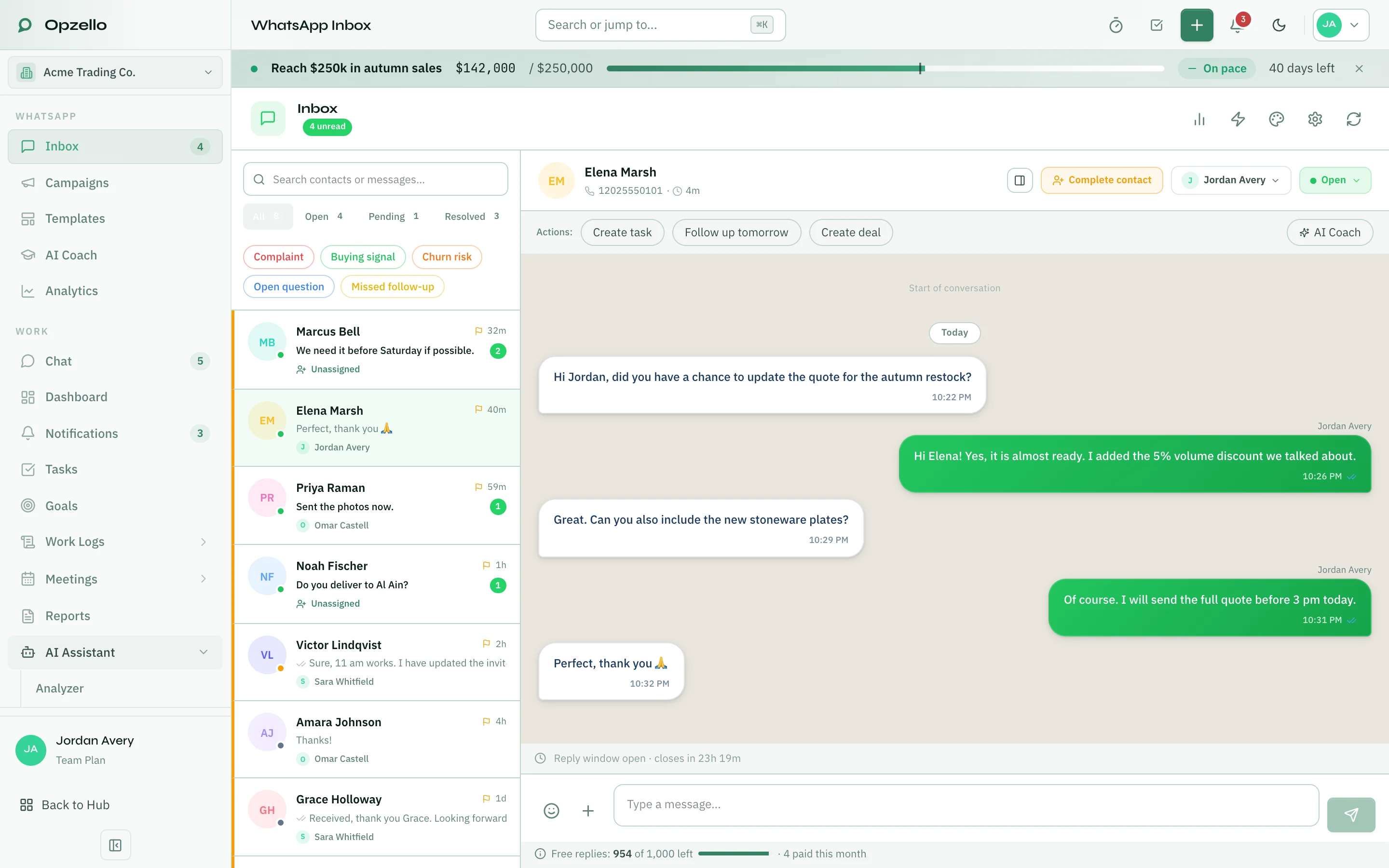
The inbox has two panels:
- Conversation list (left): every chat with your customers. Search with Search contacts or messages…. The top of the inbox shows how many messages are unread.
- Chat panel (right): the full message history with the selected customer, and the message box at the bottom.
The buttons at the top of the inbox are Refresh and Settings. Settings opens WhatsApp Settings, where each person sees only the sections they can use: My signature and Chat appearance for everyone, Automatic replies, Business hours, AI assistant and Quick replies for owners and managers, and WhatsApp connection for the owner. Analytics is under WhatsApp in the sidebar.
Filtering Conversations
Use the tabs above the conversation list:
- All: every conversation.
- Open, Pending and Resolved: only chats with that status. You change a chat's status from the open chat.
Next to the tabs are three buttons you can turn on and off:
- Unassigned: only chats nobody has picked up yet. Click it again to go back to the whole inbox.
- Blocked: only blocked contacts. Blocked contacts are hidden everywhere else.
- Archived: only archived chats. Archived chats are hidden everywhere else.
To mark a chat as unread, click More actions (the three dots) on its row and choose Mark as unread.
Who owns a chat
- The first reply takes it. When nobody owns a chat, the first teammate who replies becomes its owner. Their name shows on the chat for everyone, and the "unclaimed chat" notifications the team received are cleared. If two people reply at the same moment, only one of them gets the chat. Nobody gets a notification for this, because the owner is the person who just replied.
- Assign by hand. You can still give a chat to someone with Assign. Owners and managers can assign anyone. Everyone else can take a chat for themselves.
- The AI stays out of owned chats. While a chat has an owner and is not resolved, the AI does not reply in it. The welcome, keyword and out-of-hours replies work as before.
- A customer can ask for a person. In Auto mode, when a customer asks to talk to a person ("can I speak to someone?", "ابي اكلم موظف"), the AI hands the chat over instead of answering. If they did not say what it is about, and did not just ask something, the AI asks once ("What is it about?") and their next message is passed on. If they don't answer within 15 minutes, the chat is handed over anyway, and the notification says they did not say what about. The chat goes to the teammate who last replied to this customer, if they can still open the inbox; otherwise teammates take turns. The chat is marked pending, the new owner gets a notification (in the app, and by browser push if they turned it on) with what the customer needs, and the customer is told that a member of your team will reply. The message never says who. While you are closed it adds "during working hours", with your next opening time. If nobody can take the chat, it stays unassigned and everyone who can open the inbox is notified.
- Quiet chats resolve themselves. A chat with no messages either way for 3 days is resolved automatically. It counts as resolved on the day it went quiet, not the day it was tidied up, so older chats never pile into this week's numbers. The owner keeps the credit for it, including on their personal goals, and no rating request is sent.
- A new message starts fresh. When a customer writes into a resolved chat, the chat opens again with no owner. Automatic replies and the AI can answer again, and the next teammate to reply becomes the owner.
To see who has worked on a chat, open the contact panel (the profile button at the top of the chat). People on this chat shows the current owner, how the chat was resolved, every teammate who replied (how many replies, first and last), and the history of owners: who had the chat, when, and how they got it (assigned by a teammate, assigned automatically by replying first, or handed over by the AI). When a customer asked for a person, it also shows what they asked about. This is only visible to your team. The customer never sees it.
Team numbers in Analytics count a chat for everyone who owned it, and a chat's first reply time for the teammate who sent it, even if the chat later moved to someone else or was reopened.
Pausing automatic replies
Automatic replies (AI, welcome, keyword and out-of-hours messages) never talk over a person. After a teammate sends a message in a chat, nothing automatic goes to that customer for 30 minutes.
- One chat: the ⚡ button in the chat header switches every automatic reply off for that customer, and back on.
- The whole inbox: in WhatsApp Settings → Automatic replies, the ⚡ button next to Pause for everyone pauses them for 1 hour, 3 hours, until you next open, or until you turn them back on (Resume now). Owners and managers can pause; everyone sees when the inbox is paused.
Automations
Owners and managers set up automatic replies under WhatsApp → Settings, in the sections Automatic replies, Business hours, AI assistant and Quick replies. How it works at the top shows the order replies are checked in: rating answer, AI reply, welcome, keyword, out-of-hours. Each message gets one automatic reply at most, and the first match wins. The one exception is the AI in Auto mode while you are closed: your out-of-hours or closure message goes first, and the AI follows it. Click a step to jump to its setting.
Your changes in the first three sections wait in a bar at the bottom of the screen until you click Save changes (or press Ctrl+S, ⌘S on a Mac). A dot next to a section in the menu means it has changes you have not saved. Moving to My signature, Chat appearance or WhatsApp connection asks before you leave unsaved changes.
-
Automatic replies: the default reply language, the built-in replies (welcome, out-of-hours and rating request) and your keyword rules. Edit opens the English and Arabic versions side by side with a WhatsApp preview. The ⋮ menu on a keyword rule can duplicate it or delete it; a deleted rule can be brought back with Undo, in the same place. If two rules share a keyword, the one higher in the list wins. Each keyword rule, and the out-of-hours reply, goes to the same customer at most once every 6 hours. On a closure day, the closure's own message is sent even when the out-of-hours reply is off. A reply to the rating request counts as a rating only when it is just a number from 1 to 5, like "5", "5 stars" or "٥ نجوم", within a day of the request. The rating is saved and the chat stays resolved. Anything else the customer writes reopens the chat.
-
Business hours: your timezone, business hours and closures. A day can have up to three shifts, and a shift like 22:00 → 02:00 runs into the next morning. Shifts that overlap are marked in red and must be fixed before you can save. Copy Monday to Tue–Fri copies Monday's hours, with Undo.
-
AI assistant: whether the AI is Off, only Suggests replies for your team, or replies by itself (Auto), and How the AI should reply: the text the AI reads before every reply. In Auto mode the AI answers only chats nobody is assigned to (the first teammate who replies becomes the owner, as described under Who owns a chat), and sends at most the number of replies you set per conversation. The count starts again when a teammate replies, or the chat is reopened or resolved. When the AI hands a chat to your team (it reached the limit, was not sure, or could not answer), the chat is marked pending, your team gets a notification, and the welcome, keyword or out-of-hours reply still goes out.
At night and on closure days (Auto mode), your out-of-hours or closure message goes first. If the customer asked a question, the AI answers it. If they only said hello, the AI offers once, in the customer's language, to help right away or to let your team reply when you open, for example "I can help you right now, or our team will reply when we open at 09:00 tomorrow." It makes the offer at most once until you have opened and closed again, and it answers anything the customer asks after that. The AI makes no offer when it can't answer, for example when your workspace has used all its AI tokens. Then the customer gets only your out-of-hours or closure message. The AI always knows whether you are open and when you open next, so it never says your team is online when it is not.
-
Quick replies: saved messages your team inserts from the chat box. They are never sent by themselves, and each one saves on its own. Two quick replies can't have the same label.
On wide screens, Setup health on the right lists what is still missing. Add it opens the setting that fixes it.
Writing how the AI should reply
Click Edit to write the text yourself, or Generate from conversations to let the AI draft it from your team's chats:
- Set up. Pick a date range, the team members whose replies to learn from, and whether to use only chats rated 4–5 stars (customers mostly rate a chat once it is resolved). Open, pending and resolved chats with messages in those dates are all read. The drawer shows how many chats match and about how many AI tokens the draft uses. The AI reads short summaries of the chats and pairs of a customer question with your team's answer: the newest few in each chat, from inside your dates only. Customer names, phone numbers and emails are removed before anything is sent to the AI.
- Review. The draft appears next to your current text, or as Changes only. You can edit it. A safety check flags a customer's full name, phone number or email (these must be removed before you can approve). It also warns about a word that might be a customer's first name, and about any link, email or phone number that is not in your current text, so you can check it is yours.
- Approve and use. Nothing changes until you approve. You can close the drawer while the AI writes; you get a notification when the draft is ready.
Only one draft can be made at a time, and up to 5 a day, counted in your business time zone. A chat is read when it has a summary or a reply someone on your team typed in those dates. Automatic and AI replies never count as your team's answer. Keep Auto-analyze conversations on so chats also have summaries. The draft is written to tell the AI to answer each customer in their own language, Arabic or English.
History keeps the last 10 versions of the text, whether you typed it, approved a draft or restored an older version. You can view a version, compare it with the current text, or restore it. Restoring saves it as a new version, so nothing is lost.
Sign your messages
Open WhatsApp Settings → My signature to put your name on the messages you send. It is per person and per workspace, so you can be "Sara · Billing" in one workspace and "Sara" in another, and it only changes what you send.
- Off is the default. Your messages go out exactly as you write them.
- My name uses your profile name.
- Custom uses a label you type, up to 40 characters. Asterisks, underscores, tildes and line breaks are removed.
The customer sees your name in bold on the first line, above the message. A photo or file with no caption goes out with your name as its caption.
Only messages a person sends are signed, including quick replies and AI suggestions you choose to send yourself. AI replies, automatic replies, templates and campaigns are never signed. The signature is shown in the chat above the message and is not part of the message text the AI reads. Under the message box, a small line "Sent as" shows what the customer will see.
Analytics
Open Analytics under WhatsApp in the sidebar to see conversations, resolution rate, first response time and customer satisfaction (CSAT) over time.
The Analytics page has these tabs: Overview, Team (workspace managers only), AI Search, AI Report and AI History. AI History lists past AI results made from your WhatsApp conversations. See AI Features → AI History for how history works in all AI areas.
Contacts
When you open a chat, Opzello saves the customer's number to Contacts for you. If the contact's details are not complete, the chat shows Complete contact. You need to complete them before you can mark the chat as resolved. When the number is saved, the contact icon at the top of the chat opens Contacts under Meetings.
When the 24-hour window closes
WhatsApp lets you send free-text replies only within 24 hours of the customer's last message. After that, the chat shows Send template. A template is a message Meta has approved in advance, and it can reach the customer at any time.
- Click Send template (or + → Template).
- Pick a template. Marketing and utility templates are listed; press Refresh if you just created one in WhatsApp Manager.
- Fill in the blanks. The first one starts with the customer's name.
- Check the preview and send.
The chat reopens for free text as soon as the customer replies. Meta charges for every template message; the charge depends on the template's category and the customer's country.
Creating templates
Open WhatsApp → Broadcasts, then + New → Reusable message (managers create, edit and delete templates; other roles can view them on the Templates tab). You can also start one from + New template in the Send template dialog.
Pick a starting point:
- Continue a conversation — the most used option, for reopening a chat after the 24-hour window closes. Utility.
- Order or booking update. Utility.
- Reminder. Utility.
- Offer or promotion. Marketing.
- From scratch.
Utility vs marketing: a utility template must be about the customer's own request, order, booking or account — no offers, discounts or sales language. Meta reviews the wording and can move a template to marketing on its own if it reads as promotional.
- Good: "Hi {{customer_name}}, following up on your request about {{topic}}. Reply here to continue."
- Bad: "Hi, anything else we can help with?" — Meta treats this as marketing.
Blanks: use Add blank to insert a placeholder like a name or order number. Every blank needs a sample value so Meta's reviewers can see it filled in, and a blank can't be the very first or very last thing in the message.
Headers: a photo, video or document header needs a sample file for review, and your WhatsApp number needs the one-click Facebook connection before you can upload one.
Buttons: up to 10 — quick replies, at most 2 website links, and 1 call button. Add the Stop offers quick reply to let customers opt out of marketing messages with one tap.
Review: usually takes a few minutes. You'll get a notification when Meta approves or rejects a template. A template still in review shows greyed out in the Send template dialog until it's ready.
If a template is rejected, open it to read Meta's reason, fix the wording and resend — as many times as you need. Write with AI can suggest a fix for you (this uses AI tokens).
Editing an approved template: Meta allows one edit a day and up to 10 edits in 30 days, and the category can't be changed once approved.
Templates made in WhatsApp Manager can't be edited in Opzello, or get a new language here, when they use numbered blanks (like {{1}}) or parts the editor can't build, such as a copy-code button or a location header. Renaming numbered blanks would break campaigns that fill them by number. Edit these templates in WhatsApp Manager, or choose Copy to make a new template with named blanks; the copy tells you about any part it had to leave out.
Disabled templates: when Meta disables a template after repeated low ratings, it can't be edited or sent. Make a copy to create a new one.
Names: after you delete a template, Meta doesn't let you reuse its name for 30 days. Pick a new name in the meantime.
Drafts: Save draft keeps a new template, or a new language, in Opzello without sending it to Meta. A draft only needs a name, a category and a language, so you can save it half-finished. Open it later from the list to finish it and send it for review.
Languages: add another language to an existing template instead of creating a new one. When you send a template, Opzello automatically picks the version that matches the customer's language.
Sending a campaign
Open WhatsApp → Broadcasts and choose + New → Send to many customers (Pro and Team plans). Your campaigns are listed on the Campaigns tab, next to Templates.
- Message — pick one of your approved Marketing messages, or choose Write it now to write a new one. A new message goes to Meta for review first, then you come back to the campaign.
- Audience — choose who gets it.
- When — now, or at a time you pick.
- Review — check the summary and send. You can send yourself a test once the message is approved. If the message is still in review, the button reads Submit and send when approved.
Waiting for Meta: while the message is in review, the campaign shows Waiting for Meta and sends by itself as soon as Meta approves it (or at your chosen time, if that is later). If Meta rejects, pauses or disables the message, or it's deleted in WhatsApp Manager, the campaign goes back to draft and you get a notification with the reason. A rejected or paused message can be fixed straight from the campaign with Fix this message and sent for review again. While a campaign waits, the Templates tab won't delete its message. If Meta approves more than a day after the time you chose, the campaign also goes back to draft so you can check it instead of it sending late. To change your mind while it waits, open the campaign and choose Stop waiting; it returns to draft.
Campaigns always use a Meta-approved message, so they reach everyone in the audience, not only people who wrote in the last 24 hours. The audience is checked again at the moment the campaign sends. Older campaigns that were written as plain text still send the way they were saved.
Free and paid messages
Meta decides which WhatsApp messages cost money, and bills you for them directly.
- Replies inside the 24-hour window are free up to a monthly allowance per number. After that, each reply is charged.
- Template messages (including campaigns and Send template) are always charged. The price depends on the template's category and the customer's country.
The line under the message box shows how many free replies are left this month. The Campaigns tab of Broadcasts shows this month's free and paid messages, the approximate cost, and totals since your number was connected. Numbers update within a few hours of Meta's own report.
Paying Meta and your daily limit
Meta bills your business directly for paid WhatsApp messages, through the payment method you add inside Meta — Opzello never charges for messages and can't show a running balance. The free service messages described above (replies inside the 24-hour window, up to the monthly allowance) don't need a payment method; only template messages and replies beyond the free allowance draw on it.
To add or update the card Meta charges, open WhatsApp → Broadcasts. The Your Meta account card links straight to Meta's payment page for your business — a workspace manager sees the link; other members don't, and should ask a workspace manager to add or fix it.
The same card shows how many customers you can message in a rolling 24 hours. Every WhatsApp number starts with a daily limit; verifying your business with Meta can raise it, but verification is optional — you can create and send templates without it.
When a message shows Not delivered, the reason appears right under it. Most reasons are template or timing issues — the 24-hour window closed, the customer opted out, or Meta is briefly slowing sends. If Meta couldn't charge for the message, the reason says so, and a workspace manager sees an Add payment method in Meta link next to it that opens the same payment page.
Tips
- The unread count in the sidebar updates on its own, so you can see new messages from any page.
- When a conversation is done, set it to Resolved. The Open tab then shows only the chats that still need you. Chats you forget are resolved on their own after 3 quiet days.
- Use Unassigned at the start of the day to find chats nobody has picked up.
Thank you — that helps us improve the docs.